> ## Documentation Index
> Fetch the complete documentation index at: https://docs.oxla.com/llms.txt
> Use this file to discover all available pages before exploring further.
# UNION
## UNION
### Overview
The `UNION` combines the result sets of 2 or more select statements, removing duplicate rows between the tables.
### Syntax
Below is the syntax of the `UNION`:
```sql theme={null}
SELECT value1, value2, ... value_n
FROM table1
UNION
SELECT value1, value2, ... value_n
FROM table2;
```
The parameters from the syntax are explained below:
* `value1, value2, ... value_n`: The columns you wish to retrieve. You can also retrieve all the values using the `SELECT * FROM` query.
* `table1, table2`: The tables that you wish to retrieve records from.
**Things to consider:**
1. The data types of corresponding columns in the `SELECT` queries must be compatible.
2. The order of columns is flexible as long as the columns in consecutive places are pairwise compatible. For example, you can do `SELECT col1, col2 FROM table1 UNION SELECT col2, col1 FROM table2`.
### Example
Let's consider an example of the `UNION`. Assume we have a table called `employees` and another table called `contractors`. We want to retrieve a combined list of names from both tables, excluding duplicates:
```sql theme={null}
CREATE TABLE employees (
emp_id INT,
emp_name TEXT
);
CREATE TABLE contractors (
contractor_id INT,
contractor_name TEXT
);
INSERT INTO employees VALUES
(1, 'John'),
(2, 'Alice'),
(3, 'Bob');
INSERT INTO contractors VALUES
(101, 'Alice'),
(102, 'Eve'),
(103, 'Tom');
```
Verifying inserted values by using the `SELECT` statement:
```sql theme={null}
SELECT * FROM employees;
SELECT * FROM contractors;
```
```sql theme={null}
emp_id | emp_name
--------+----------
1 | John
2 | Alice
3 | Bob
contractor_id | contractor_name
---------------+-----------------
101 | Alice
102 | Eve
103 | Tom
```
Let’s combine the values from the tables:
```sql theme={null}
SELECT emp_name FROM employees
UNION
SELECT contractor_name FROM contractors;
```
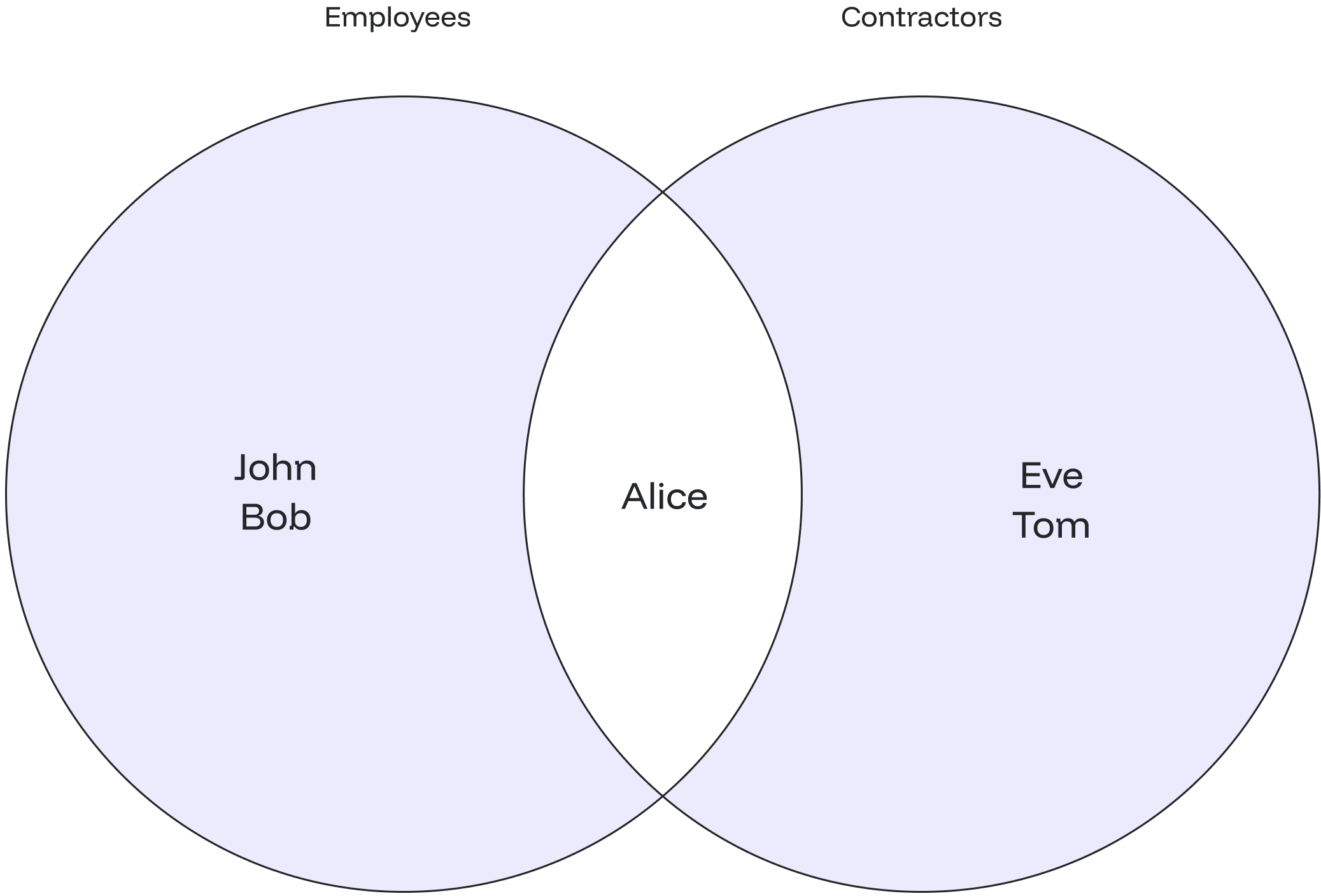
You will get the values of both tables, and there won’t be any duplicate values.
```sql theme={null}
emp_name
----------
Alice
Bob
Eve
John
Tom
```
The diagram below shows that the duplicate name "Alice" is represented only once in the output, fulfilling the requirement to avoid duplicate entries.
 ## UNION ALL
### Overview
The `UNION ALL` combines the result sets of 2 or more select statements, returning all rows from the query and not removing duplicate rows between the tables.
### Syntax
Below is the syntax of the `UNION ALL`:
```sql theme={null}
SELECT value1, value2, ... value_n
FROM tables
UNION ALL
SELECT value1, value2, ... value_n
FROM tables;
```
The parameters from the syntax are explained below:
* `value1, value2, ... value_n`: The columns you wish to retrieve. You can also retrieve all the values using the `SELECT * FROM` query.
* `table1, table2`: The tables that you wish to retrieve records from.
**Things to consider:**
## UNION ALL
### Overview
The `UNION ALL` combines the result sets of 2 or more select statements, returning all rows from the query and not removing duplicate rows between the tables.
### Syntax
Below is the syntax of the `UNION ALL`:
```sql theme={null}
SELECT value1, value2, ... value_n
FROM tables
UNION ALL
SELECT value1, value2, ... value_n
FROM tables;
```
The parameters from the syntax are explained below:
* `value1, value2, ... value_n`: The columns you wish to retrieve. You can also retrieve all the values using the `SELECT * FROM` query.
* `table1, table2`: The tables that you wish to retrieve records from.
**Things to consider:**
1. The data types of corresponding columns in the `SELECT` queries must be compatible.
2. The order of columns is flexible as long as the columns in consecutive places are pairwise compatible.
### Example
Suppose you have two separate tables, `sales_2022` and `sales_2023`, containing sales data for different years. You want to combine the sales data from both tables to get a complete list of sales transactions without removing duplicates.
```sql theme={null}
CREATE TABLE sales_2022 (
transaction_id INT,
product_name TEXT,
sale_amount INT
);
CREATE TABLE sales_2023 (
transaction_id INT,
product_name TEXT,
sale_amount INT
);
INSERT INTO sales_2022 VALUES
(1, 'Product A', 1000),
(2, 'Product B', 500),
(3, 'Product C', 750);
INSERT INTO sales_2023 VALUES
(4, 'Product A', 1200),
(5, 'Product D', 800),
(6, 'Product E', 950);
```
Verifying inserted values by using the `SELECT` statement:
```sql theme={null}
SELECT * FROM sales_2022;
SELECT * FROM sales_2023;
```
```sql theme={null}
transaction_id | product_name | sale_amount
----------------+--------------+-------------
1 | Product A | 1000
2 | Product B | 500
3 | Product C | 750
transaction_id | product_name | sale_amount
----------------+--------------+-------------
4 | Product A | 1200
5 | Product D | 800
6 | Product E | 950
```
Let’s combine all values from the tables by using the `UNION ALL`:
```sql theme={null}
SELECT product_name, sale_amount FROM sales_2022 UNION ALL SELECT product_name, sale_amount FROM sales_2023;
```
In this case, it will display all the values of the first table followed by all the contents of the second table.
```sql theme={null}
product_name | sale_amount
--------------+-------------
Product A | 1000
Product B | 500
Product C | 750
Product A | 1200
Product D | 800
Product E | 950
```
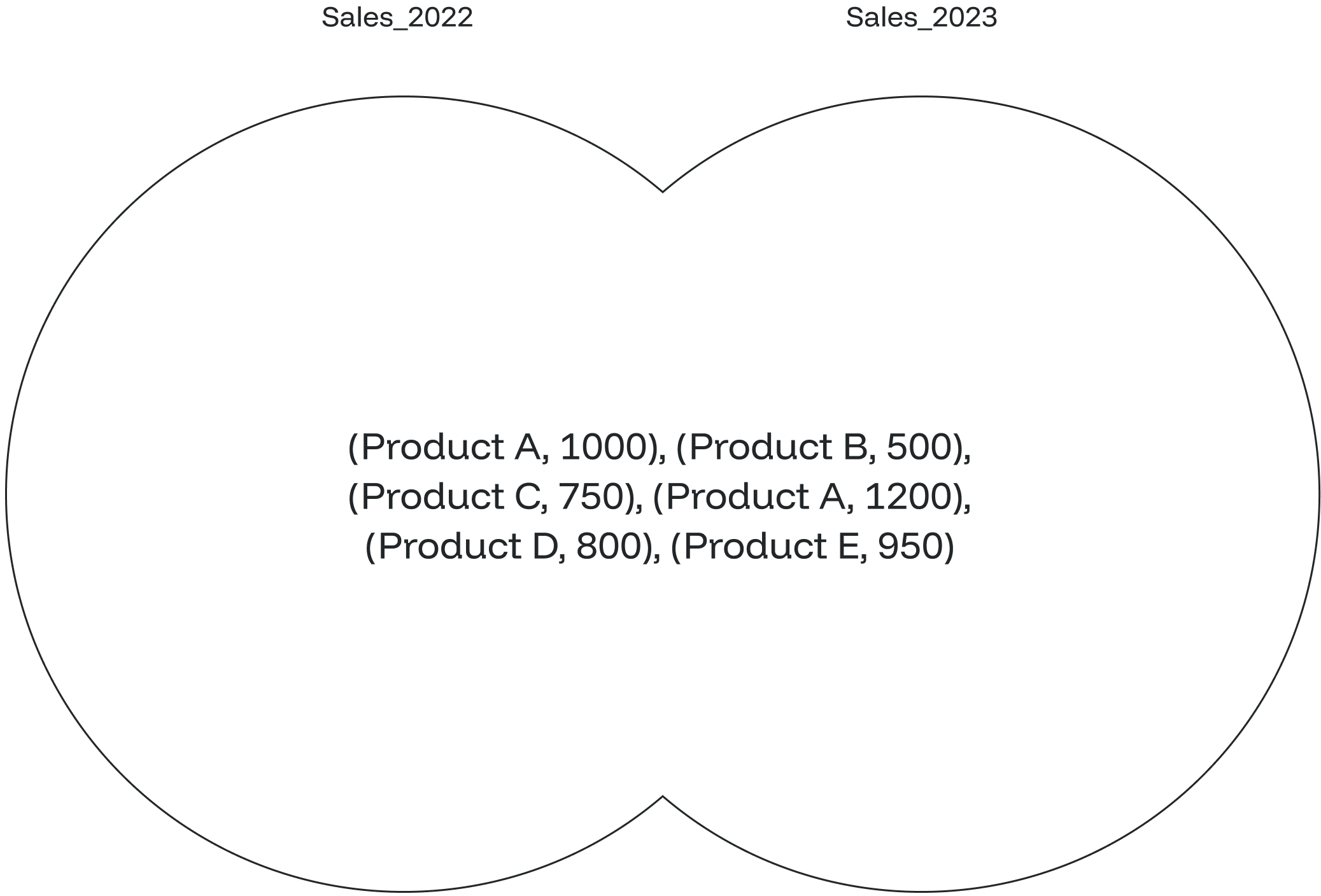
The diagram illustrates that with the `UNION ALL`, all values are displayed, including the duplicate ones.